ADFS 서비스에 할당한 인증서가 만료되어 다시 인증서 갱신을 하고 바뀐 인증서의 지문정보를 기반으로 인증서를 할당하려고
Set-AdfsSslCertificate 명령을 실행하니 아래와 같은 오류가 발생되었다.
[오류 내용]
Set-AdfsSslCertificate : PS0317: One or more of AD FS servers returned errors during execution of command 'Set-AdfsSslCertificate'. Error information: PS0316: AD FS Server: 'localhost', Error: 'Connecting to remote server l
ocalhost failed with the following error message : WinRM cannot process the request. The following error with errorcode 0x80090322 occurred while using Negotiate authentication: An unknown security error occurred.
Possible causes are:
-The user name or password specified are invalid.
-Kerberos is used when no authentication method and no user name are specified.
-Kerberos accepts domain user names, but not local user names.
-The Service Principal Name (SPN) for the remote computer name and port does not exist.
-The client and remote computers are in different domains and there is no trust between the two domains.
After checking for the above issues, try the following:
-Check the Event Viewer for events related to authentication.
-Change the authentication method; add the destination computer to the WinRM TrustedHosts configuration setting or use HTTPS transport.
Note that computers in the TrustedHosts list might not be authenticated.
-For more information about WinRM configuration, run the following command: winrm help config. For more information, see the about_Remote_Troubleshooting Help topic.'.
At line:1 char:1
+ Set-AdfsSslCertificate -Thumbprint "Thumbprint Data" ...
+ ~~~~~~~~~~~~~~~~~~~~~~~~~~~~~~~~~~~~~~~~~~~~~~~~~~~~~~~~~~~~~~~~~~~~~
+ CategoryInfo : NotSpecified: (:) [Set-AdfsSslCertificate], RemoteException
+ FullyQualifiedErrorId : RuntimeException,Microsoft.IdentityServer.Management.Commands.SetSslCertificateCommand
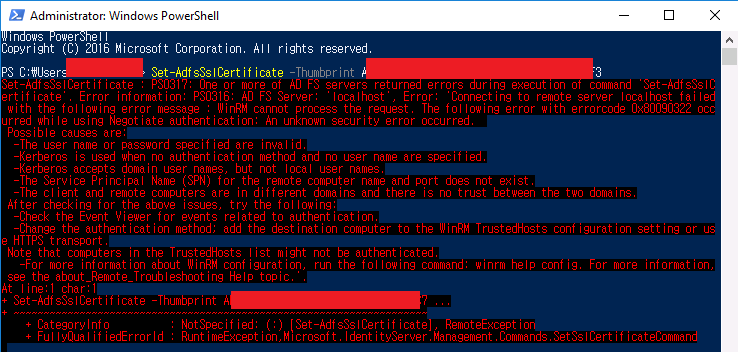
일전에 ADFS 마이그레이션을 하다가 ADFS서비스 계정에 SPN을 설정한 적이 있는데 그게 문제였던 것으로 추측된다.
문제는 당시 서비스 계정에 SPN을 설정하지 않았다면 팜 조인을 할 수 없었을 뿐더러 마이그레이션 자체를 할 수 없었다.
https://dcpromo.tistory.com/28?category=883538
ADFS & SPN(Service Principa Name)등록 시 0x21c7 오류 발생
ADFS서버의 마이그레이션을 하기 위해 Farm Join 단계 중 사전체크에서 SPN오류가 발생하였다. 6가지 정도가 발생되었으나 SPN 오류에서 발생된 문제로 SPN를 수정(등록) 후 진행을 할 수 있다. SPN오류
www.dcpromo.co.kr
뭐 어쩌라는건지....
당시 서비스 계정에 할당한 SPN설정을 제거하고 Set-AdfsSslCertificate명령을 실행해보니, 정상적으로 처리가 된다.
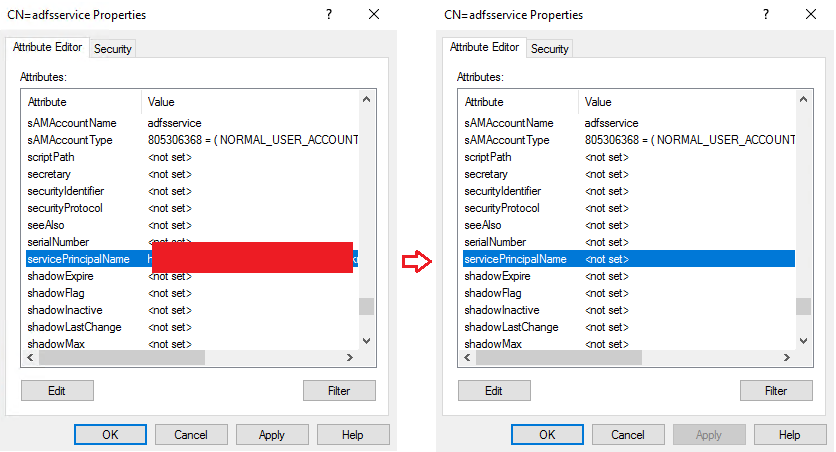

아니면 아래의 방법으로도 Set-AdfsSslCertificate를 사용하지 않고도 인증서를 할당할 수 있다.
두가지 모두 테스트 했으나, SPN설정을 수정하고 하는 것을 추천한다.
[삭제]
netsh http delete sslcert hostnameport=ADFS Server FQDN:443
netsh http delete sslcert hostnameport=localhost:443
netsh http delete sslcert hostnameport=ADFS Server FQDN:49443
netsh http delete sslcert hostnameport=EnterpriseRegistration.domain:443
[다시등록]
$guid = "5d89a20c-beab-4389-9447-324788eb944a"
$certhash = "Certificate Thumbprint"
$hostnameport = "ADFS Server FQDN:443"
$Command = "http add sslcert hostnameport=$hostnameport certhash=$certhash appid={$guid} certstorename=MY sslctlstorename=AdfsTrustedDevices clientcertnegotiation=disable"
$Command | netsh
$hostnameport = "localhost:443"
$Command = "http add sslcert hostnameport=$hostnameport certhash=$certhash appid={$guid} certstorename=MY sslctlstorename=AdfsTrustedDevices clientcertnegotiation=disable"
$Command | netsh
$hostnameport = "ADFS Server FQDN:49443 "
$Command = "http add sslcert hostnameport=$hostnameport certhash=$certhash appid={$guid} certstorename=MY sslctlstorename=AdfsTrustedDevices clientcertnegotiation=disable"
$Command | netsh
$hostnameport = "EnterpriseRegistration.domain:443"
$Command = "http add sslcert hostnameport=$hostnameport certhash=$certhash appid={$guid} certstorename=MY sslctlstorename=AdfsTrustedDevices clientcertnegotiation=disable"
$Command | netsh
직접 확인한 내용을 기반으로 작성되었습니다.
'Directory Service' 카테고리의 다른 글
| 단일 DC에서 DNS서비스 콘솔 연결 시 엑세스 거부 (0) | 2022.10.19 |
|---|---|
| Azure AD 동기화 환경에서 계정 언어 설정 (0) | 2022.09.19 |
| Change Domain Controller - Unavailable (0) | 2022.08.19 |
| ADFS & SPN(Service Principa Name)등록 시 0x21c7 오류 발생 (0) | 2022.07.12 |
| Certificate enrollment , 0x800706ba, WIN32: 1722 RPC_S_SERVER_UNAVAILABLE 오류 (0) | 2022.04.14 |